Converting AB PLC DH485 to USB
Converting AB PLC DH485 to RS232 and then to USB can be tricky.
This is a sample of the kind of information on our PLC Cables and Drivers Training Video DVD ...
Connecting RS485 (DH485) from PLC to RS232 (9 pin port) on a PC (laptop) can be simple as having the correct cable. But the evolution of computers has made the conversion not quite so simple nowadays. Most computers (laptops) nowadays do not have a 9 pin RS232 serial port but utilize USB ports.
As shown in the video about Allen Bradley PLC Cables (AB Demo on YouTube), you can not use the AB PIC box (RS485 to RS232 converter cable) with a USB to RS232 converter cable. You must get a single cable designed to convert RS485 to USB. As there are electronics involved, it is not just straight wiring. Then with some PLC vendors, they might slightly modify the protocol so you have to buy the RS485 to USB converter directly from the PLC vendor. Like AB uses what they call "DH485" and sells a 1747-UIC converter to do the job with one cable.
You can also use an RS232 port replicator (plugs into your PCMCIA slot instead of using a USB to RS232 converter cable). The port replicator creates a com 1 as if it is the original laptop comport, in contrast to the USB to RS232 converter which randomly picks a com port number (except com 1), like com 13 for example. You still can not use the port replicator with a PIC box (RS232 to RS485 converter), but it is easier to use with a serial null modem cable than a USB to RS232 converting cable because the PLC communication software (like RSLinx) also defaults to com 1.
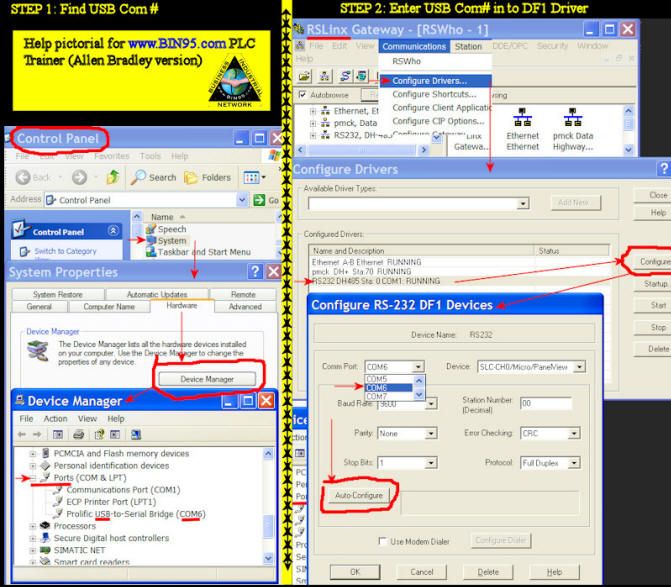
To find out what com port your USB to RS232 cable driver decided to use, you need to view [Device Manager] - To open Device Manager, click Start, point to Settings, and then click Control Panel. Double-click System. On the Hardware tab, click Device Manager. Scroll down to "Ports" one in the list will be your USB to RS232 driver and you will see the com port number to the right of it. Then you can go to RSLinx or whatever your PLC communication software is, and set com port accordingly for the RS232 driver in RSLinx.
When using a USB to RS232 converter cable with the PLC vendor's RS485 to RS232 cables, like the AB PLC cable, you not only have the electronics, com 1 dependency; but also a driver for the USB converter cable, drivers for the RS485 cable, and drivers for the PLC software like RSLinx.
All the drivers, software, and hardware leave a lot of room for conflicts, incompatibility, and headaches. So save yourself some headaches and use a PCMCIA com port replicator instead of a USB to RS232 converter cable.
On a side note: It has been indicated by experts in the field that an RS232 to RS485 converter does not work with a USB to RS232 converter cable because of the power requirements of the electronics in the RS485 converter and the communication speed requirements of the RS485 converter. It has been rumored that a Belkin USB to RS232 converter will work, but at this time we have not proved this. We stick with the non-OEM replacement for the 1747-PIC box, like the one provided with the AB Micro800 PLC Trainer or the Allen Bradley 1747-UIC specifically made to convert USB to RS484.
Watch AB PLC Cables Video on YouTube
Purchase Full Copy of AB PLC Cables - Drivers Video DVD
PLC Training Video Library (10 DVD Set w/ workbook)
PLC Technicians Dream bundle (Highly interactive training software with simulations.)
Electrical Training Video Library (10 DVD Set w/ workbook)
You also might want to check out the introductory article on How to install RSLinx Driver. It has a built-in simulator game to help you learn and have fun doing it!