
Infrared Data Surveys ...
- Home >
- articles >
- electrical >
- infrared data surveys
How to Reduce Data Errors on Infrared Surveys.
By Harley Denio
Infrared Data Surveys Article:
Over the last couple of decades, there have been many changes to infrared (IR) imagers and
ancillary equipment that make infrared data gathering and processing easier and more
accurate. Over the past 16 years as an infrared thermographer (6 years in-house and 10 years as a
contractor) I have performed inspections on a wide array of applications and captured over 100,000
IR images. During that time, I have run across many examples of common problems in gathering
accurate infrared data which I call 'data errors'. Below, I will illustrate some lessons learned and I hope to help
thermographers avoid some of the same mistakes that I have made.
Every time a thermographer goes out into the field to perform an infrared survey, the conditions are different.
You could be in a factory that has highly loaded, heat generating equipment all around or in an office
Building that has only one mechanical room on each floor with lightly loaded equipment. You could be
infrared scanning all day on the roof of a complex looking at A/C units on a sunny day or in a computer room
that is air-conditioned. Different types of electrical equipment testing (fuses, contactors, breakers, load, etc.)
Have different heat signatures and require consideration on an individual basis for accuracy. Every
situation requires the thermographer to look around at the surrounding environment and make a
judgment as to what special conditions might exist, and how to gather the infrared data accurately.
Below, a guide for proper infrared data collection procedures and examples of what you should remember during an infrared survey.
General Thermography: Setting up the Job
Infrared Camera Setup
Set as many parameters at the job site as possible and practical:
O Atmospheric temperature setting
o Background temperature
o Emissivity of targets
o Distance to target
These are all done on the camera and should be addressed at each change of environment, for
example, going from inside to outside of building.
Safety
O When doing work around troubleshooting electrical equipment, wear all necessary personal protective
equipment as required by NFPA 70E.
O While infrared scanning, always take a look around, above and below and change positions.
O When looking through a viewfinder, keep the other eye open.
O Never work alone if you can help it.
O Don't wear things hanging around you when working around rotating equipment, like the
lens cap, ID tags, hanging clipboard, etc.
O Don't wear rings or any conductive jewelry around electric devices.
O Always carry a means for communication such as cell phones, radios, etc.
O If you have to scan from a ladder, have an assistant hold it steady.
Infrared Data Gathering
O Talk to end-user about any special safety hazards.
O Talk to end-user about any recent failures, like leaks, tripped breakers, failed motors,
moisture in the building, bad recent storms, etc.
O Use a PDA or laptop for infrared data entry. Use paper only when necessary.
O Don't rely on your memory. Always take the time to enter infrared data before moving to the next
area, when making the scan list or recording exception temperatures.
O Start and keep an "accumulated images" file on the computer and save every image that
you take (thermal and visual). This is for backup & archival purposes.
O Get a very good photo camera and set it to a high mega-pixel setting. Do not use the
visual camera on the imager for making reports. It is extra work-but worth it for the better
detail and archiving images that can be zoomed-in for details later.
O Make sure all batteries needed for the job are fully charged.
Electrical Equipment Infrared Scanning: General
- Wear the safety gear:
- Minimum (when not near the equipment) is a hard hat, safety glasses, ear protection
when required, and protective boots. - Minimum (when removing covers) is mandated by NFPA 70E.
- Minimum (when not near the equipment) is a hard hat, safety glasses, ear protection
- Be a licensed electrician in the state you are working in before removing any covers.
- Observe that all screws are in place before removing any covers, especially on electrical panel
deadfronts. Otherwise a slipped cover can cause injury, or a tripped breaker. - Look for burned wires visually. There may have been a problem in the past, but there is no load
at the time of the infrared scanning and no heat signature. - Form an exit strategy when entering an area in case of any problems.
- Use all your senses for any indications of problems. Smell the heat, hear the failing motor, see
the arcing connection. - Remove all jewelry when working around electrical equipment and mechanical equipment.
- Do not reset any tripped breakers without communicating with customer.
Electrical Equipment Testing: Infrared Data Errors
- Infrared Reflections
When infrared scanning highly reflective [low emissivity] targets such as bus bars, be sure to change your angle to eliminate the reflections on the image. The reflection could be from your body heat, or some other heat source in the area -a piece of machinery, light bulb or a transformer. Reflections will give you incorrect infrared data in the thermal image, and if not understood, it is an infrared data error.
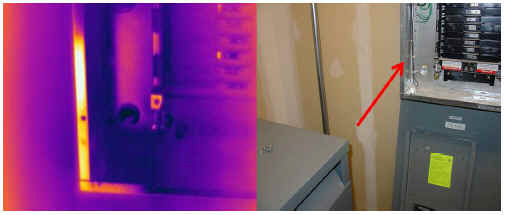
Figure 1 - Reflection of transformer in panel signature.
- Mismatched and Wrong-sized Fuses
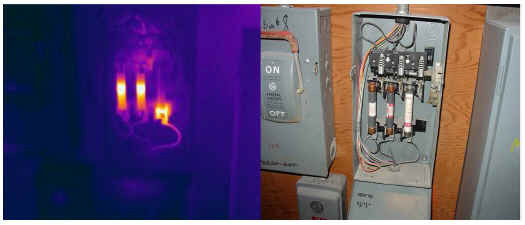
Sometimes in facilities maintenance work, a piece of equipment will cause a fuse to fail and it needs to be up and running right away. Maybe it continues to fail regularly and becomes a nuisance. Often the repair personal will rummage through a box of spare fuses and install a fuse of the same size amperage rating, but of a different brand and fail setting. Also, when a piece of equipment fails regularly [due to a PROBLEM], the maintenance person might install a fuse of the next size up in amperage rating from proper rating, just to make the problem go away. I'm not saying this is right - but that it happens and often! Fuses installed this way have a particular heat signature and can be found with infrared thermography. If the fuse is too large, it will read cool as compared to the others in the group. If it is too small, then of course it will read warmer than the group. If there is a different trip setting in the mismatched fuse, it will have yet a different heat signature.
Figure 2 - Mismatched and wrong size fuses
- Trip Sensors
Trip sensors are electric devices in breakers that measure temperature or amperage in the device, and when it reaches above the set limit, the breaker trips. These devices put out a particular thermal signature. It is common infrared data error, often misdiagnosed as an internal problem inside the breaker. GFCI breakers and GFCI receptacles also have a similar heat signature.
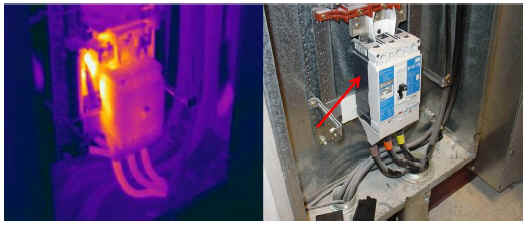
Figure 3 - Trip sensor on a molded case breaker
- Bad Photo Angle
When taking thermal images, make sure there is enough view of the surrounding area to help find what component is being identified for attention. Always take the thermal image and visual image from the same angle and distance. This will help the end-user return to the same place when repairs are to be done.
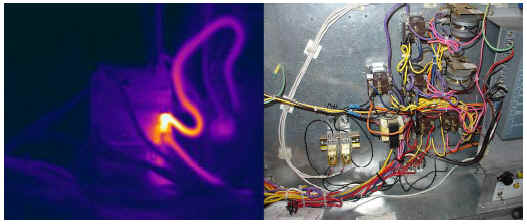
Figure 4 - Bad photo angle Wear appropriate safety gear.
| Author Biography: Harley Denio is President of Oregon Infrared, a full-service infrared service provider based near Portland, OR. He is a Level III Certified Infrared Thermographer and a Licensed Supervisor Electrician. Mr. Denio speaks at infrared seminars and has published four technical papers on infrared thermography. Thank you readers for your interest. |


